TLX Presentation MCP behavior review
Use this portal to run structured test cycles, record what works, document failures clearly, and give Brendon a practical change list with reproduction steps and evidence.
1. Evaluation charter
Confirm expected behavior
Run several cycles through the MCP to verify tool discovery, resource access, deck validation, rendering, and generated artifacts behave consistently.
Actionable feedback
Each issue should include what happened, expected behavior, reproduction prompt/payload, severity, owner, and evidence links.
Katie + Brendon
Katie captures evaluation findings. Brendon can use the issue log and test cases to reproduce, prioritize, and patch the MCP.
Decision criteria
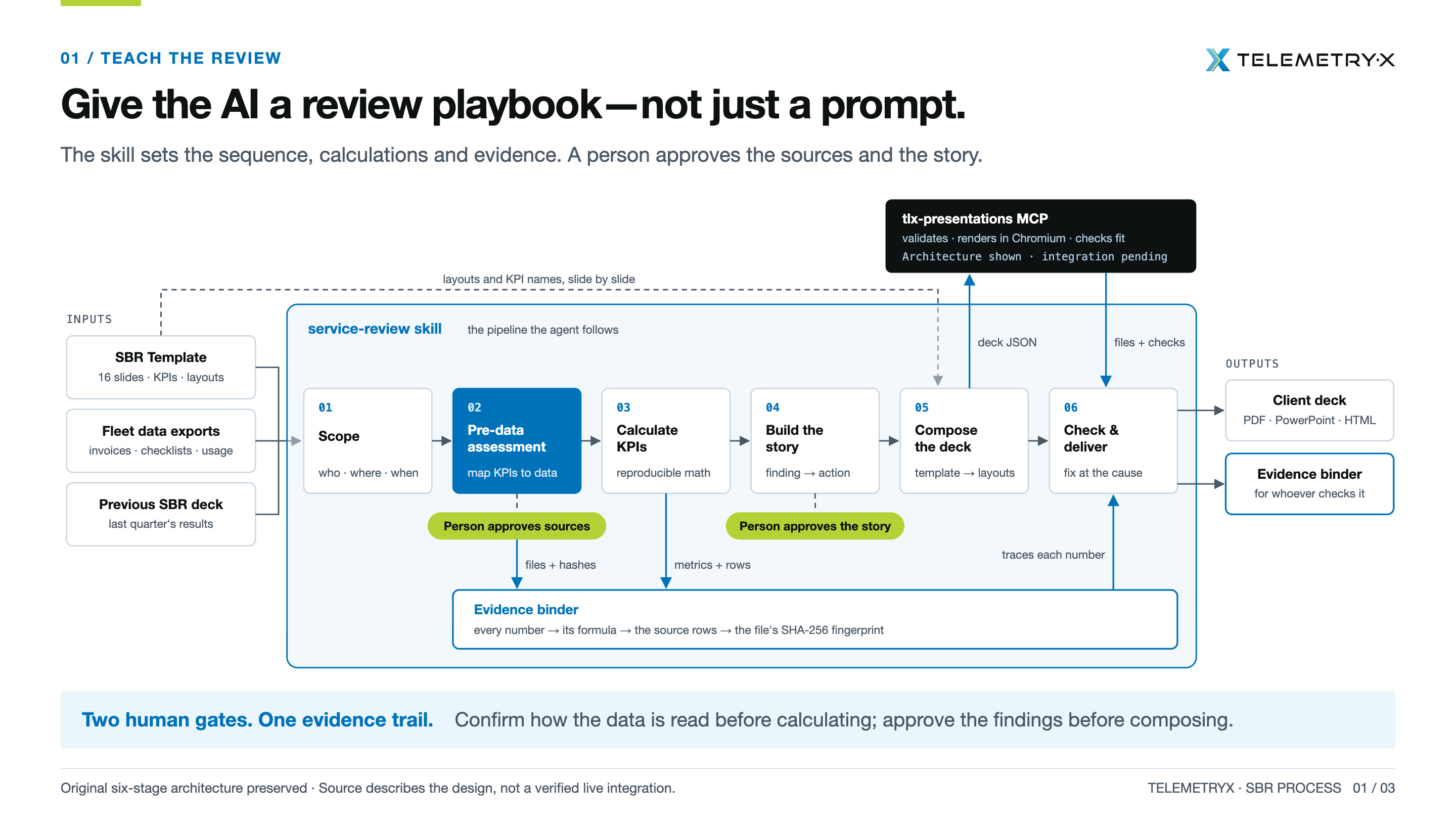
SBR end-to-end test: review playbook → approved toolkit → MCP delivery
Playbook before prompt
The review skill owns sequence, calculations, source approvals, story approval, and evidence-binder expectations.
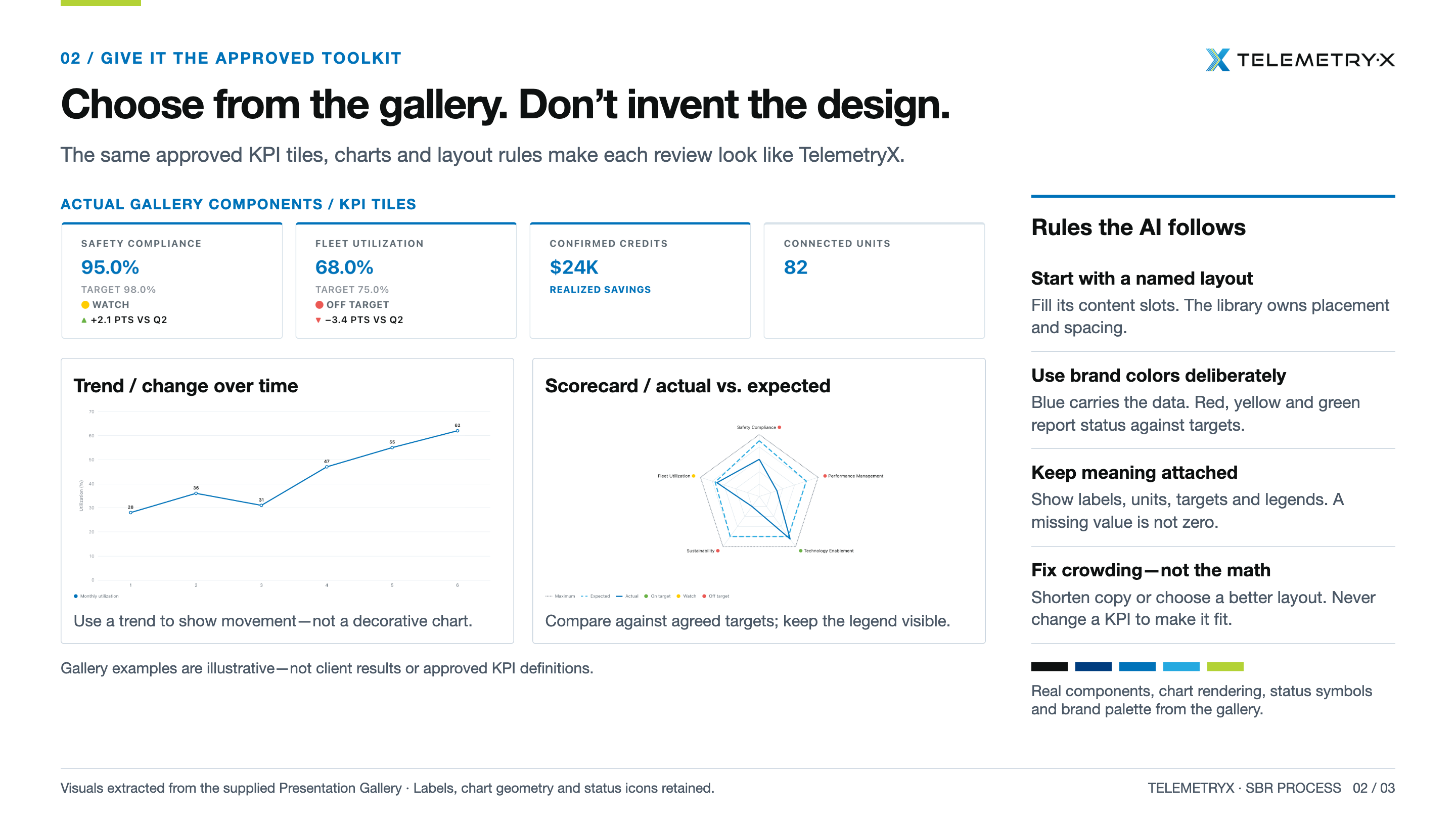
Gallery before invention
The MCP must use named layouts, KPI tiles, charts, brand colors, status symbols, labels, units, targets, and visible legends from the approved gallery.
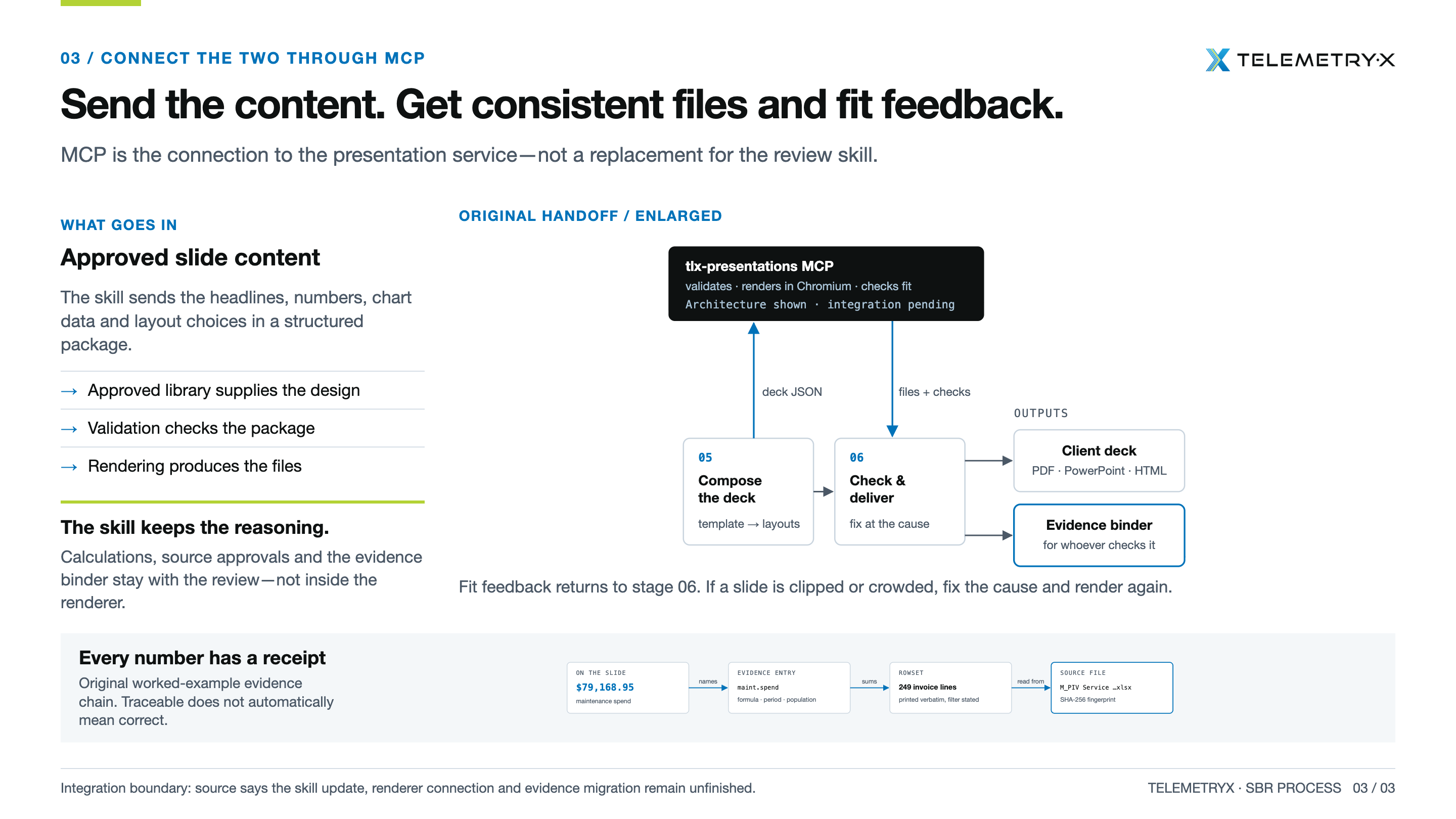
Content in, files out
The skill sends approved headlines, numbers, chart data, and layout choices. MCP validates, renders, checks fit, and returns files plus checks.
Reference journey slides
End-to-end test script
| Stage | Test action | Expected MCP behavior | Pass evidence |
|---|---|---|---|
| Inputs | Provide SBR template intent, fleet data exports, and previous SBR deck context. | MCP should not infer missing business calculations; it should require structured approved content or evidence ledger inputs. | Missing evidence is flagged as missing/confirm, not converted to zero or invented. |
| 01 Scope | Define who / where / when for the review. | Deck meta and footer reflect client/location/period; no unsupported context band is added. | Rendered deck shows correct client and location in footer. |
| 02 Pre-data assessment | Map KPIs to source files and ask for source approval. | Evidence route requires file names, hashes, source roles, and approved readings before calculations. | Evidence binder or feedback lists files, hashes, and source-role mapping. |
| 03 Calculate KPIs | Run reproducible KPI calculation from raw rows or evidence ledger. | Every number shown in the deck traces to a metric, formula, rowset, and source file fingerprint. | Binder traces each slide number to source rows and SHA-256 file fingerprint. |
| 04 Build the story | Approve findings and action headlines before composition. | MCP renders approved content; it does not rewrite the story or change KPIs to make a slide fit. | Headlines and conclusions match the approved story packet. |
| 05 Compose the deck | Send deck JSON with named gallery layouts, KPI tiles, chart data, labels, targets, units, and legends. | Validation checks package; composition uses approved library components and brand rules. | presentation_validate returns no errors; output follows TLX gallery style. |
| 06 Check & deliver | Request HTML, PPTX, PNG/PDF outputs and inspect fit. | Files are generated consistently; fit feedback identifies crowding/clipping and asks to fix the cause and rerender. | Files open, slide count matches JSON, no clipping, and checks are documented. |
| Outputs | Deliver client deck and evidence binder. | Client deck and evidence binder are separate outputs; reasoning stays with review/evidence, not hidden in renderer. | Deck files plus binder/checks are saved and shareable. |
Acceptance tests to add to every cycle
- Human gate 1: verify the test captures “person approves sources” before KPI calculation.
- Human gate 2: verify the test captures “person approves the story” before deck composition.
- Evidence trail: verify every number has a receipt: formula, source rows, rowset, and file SHA-256 fingerprint.
- Gallery discipline: verify the MCP starts with named layouts and approved components instead of inventing design.
- Status semantics: verify blue carries data and red/yellow/green only report target status.
- Fit behavior: verify crowded slides trigger feedback to shorten copy or choose a better layout, never alter a KPI.
- Output consistency: verify HTML/PPTX/PNG/PDF outputs represent the same content and slide order.
2. Test cycle runner
3. Feedback capture
Feedback log
4. Developer handoff
Minimum repro packet
Every fail/watch item should include:
- Exact MCP tool used
- Prompt or JSON payload
- Expected output
- Actual output/error
- Generated file path or screenshot
- Severity and recommended fix
Severity definitions
P0: blocks connection, tool use, or artifact generation.
P1: output is generated but wrong, misleading, clipped, or not usable for customer-facing work.
P2: improvement, polish, wording, speed, or developer-experience issue.
Known baseline from current setup
| Check | Result | Evidence |
|---|---|---|
| Correct endpoint | Pass | https://ca-tlx-presentations-dev.livelytree-0c387508.westus3.azurecontainerapps.io/mcp |
| Tool discovery | Pass | 8 tools discovered: catalog, compose, guidelines, design system, gallery, SBR guidelines, validate, sbr_calculate. |
| Resource discovery | Pass | 4 resources discovered: gallery, design-system, presentation-design, sbr-guidelines. |
| GET /mcp | Watch | Returns Method Not Allowed; acceptable if MCP requires POST, but document for users who test URL in browser. |
| SBR E2E reference | Pass | Portal now includes the three-slide visual journey: review playbook, approved toolkit, MCP delivery. |
Share note for Brendon
Purpose: This portal tracks repeated evaluation cycles for the TLX Presentation MCP. Use the exported JSON/CSV and the feedback log to reproduce issues and confirm fixes. The framework is intentionally static so it can be shared as a link or edited directly in source control.
5. Cycle archive
| Cycle | Date | Scope | Pass | Watch | Fail | Decision |
|---|